
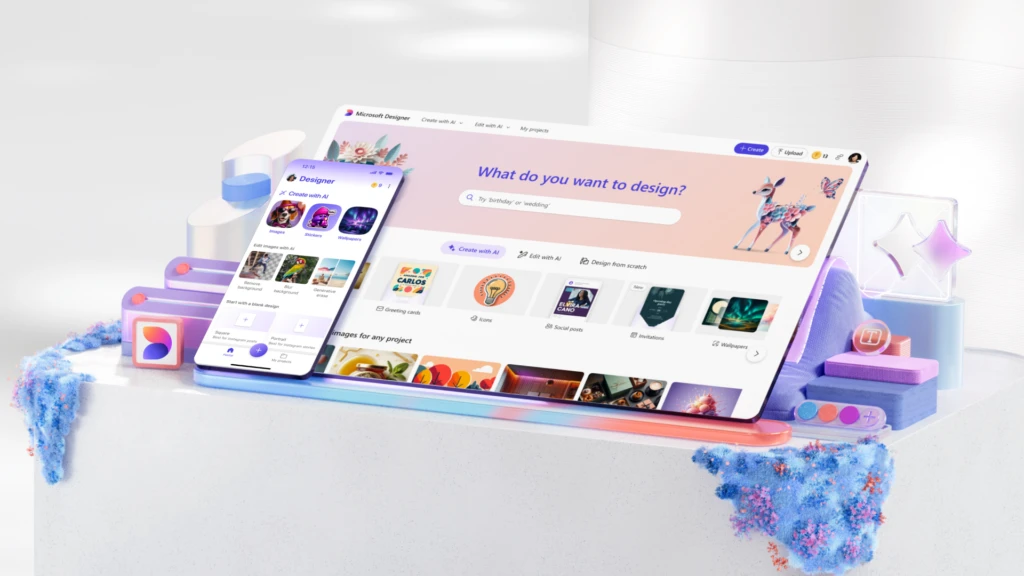
Creativity begins with an idea, and that idea starts with you. We’re excited to announce that the Microsoft Designer app is now generally available to anyone with a personal Microsoft account. With new AI-driven features, Designer helps you bring your most creative ideas to life in seconds. Whether you have a clear vision or need help getting started, Designer turns your ideas into reality with just a simple description.
Gone are the days when a blank canvas felt intimidating—simply describe what you want, and Designer will create it for you. If you’re unsure where to begin, the app’s AI-powered tools will help spark your creativity.
Designer: Always There When Inspiration Strikes
The power of Microsoft Designer lies in its seamless integration into your everyday life. You can now access Designer across multiple Microsoft products, such as Word, PowerPoint, and Microsoft Photos, thanks to Microsoft Copilot. Whether you’re drafting documents, building presentations, or editing photos, Designer keeps you in your creative flow whenever and wherever you need it.
Now available in over 80 languages on the web, Designer also comes as a free mobile app on iOS and Android, as well as a dedicated app for Windows.
Designer at Your Fingertips: Across Microsoft Apps and On the Go
Designer’s integration with Copilot in popular Microsoft 365 apps—like Word and PowerPoint—allows you to elevate your documents and slides effortlessly. With a Copilot Pro subscription, you can create images and designs directly within these apps. Want to generate an image or a custom banner for your document? Simply click the Copilot icon, describe your vision, and Designer will generate a design tailored to your needs.
For those who prefer designing on the go, the Designer mobile app is packed with AI-powered features, enabling you to create stunning images and designs or edit photos with just your words.
Additionally, Microsoft Photos users can now leverage Designer’s AI editing tools, making it easy to erase objects, remove backgrounds, apply filters, and more—all without leaving the app. Future updates will bring these capabilities to Microsoft Edge, allowing you to use Designer directly from your browser.
New Features for Innovative Creation in Designer
The latest updates to Designer introduce several exciting features that make the creative process even easier, whether you’re using the mobile app or the web version:
- Prompt Templates: Struggling with a blank page? Prompt templates offer pre-populated ideas and styles to help jumpstart your creative process. Experiment with these templates, customize them, and even share them with friends or collaborators to inspire each other.
- Custom Stickers: Bring your ideas to life by sharing phrases or thoughts, and Designer will generate custom stickers perfect for social media or messaging apps. Create your own emojis, clip art, monograms, avatars, and more with just a simple description.
- Greeting Cards and Invitations: Craft personalized cards for birthdays, holidays, or any occasion by simply describing what you want. Similarly, design custom invitations for events like graduations, anniversaries, and more with just a few words.
- Restyle Images: Turn any photo into a work of art. Upload your image, choose a style, and add additional details to create a completely unique new version of your photo.
- Custom Frames and Collages: Designer makes it easy to transform your photos into shareable memories. Create custom image frames or design photo collages by selecting images, choosing a style, and customizing the layout.
More Features on the Horizon
We’re constantly adding new features to Microsoft Designer. Coming soon is the Replace Background tool, currently in preview in select markets. This feature allows you to change the background of your still-life photos by simply describing the new setting—ideal for showcasing projects in a fresh light.
Additionally, Designer now includes 15 free daily boosts for creating and editing AI-powered images faster. You can upgrade to a Copilot Pro subscription for access to 100 boosts per day.
Responsible AI: Prioritizing Safety and Ethics
At Microsoft, we are committed to building tools that unleash the potential of generative AI while ensuring a safe and ethical user experience. We’ve implemented robust measures such as guardrails, threat monitoring, and abuse detection to mitigate risks and protect users from misuse. Our ongoing commitment to responsible AI ensures that our systems operate securely and ethically.
Get Started with Microsoft Designer Today Ready to unlock your creativity? With Microsoft Designer, if you can describe it, you can design it. Try it out today to create and edit anything you can imagine using AI. Whether you’re a seasoned designer or just starting out, Designer helps you turn your ideas into reality effortlessly.